
Quick answer: For typed essays against a rubric, CoGrader and EssayGrader are the strongest starting points, and both have usable free tiers. For handwritten work and large exam batches, Gradescope is the heavyweight — but it is usually an institutional purchase, not a solo subscription. No tool here earns blind trust: run the same-essay test in this guide before any of them touch a real grade.
A grading tool can save you a weekend. It can also hand a student a confident-sounding score that has little to do with your rubric. The difference between those two outcomes is rarely the tool. It is how you check it.
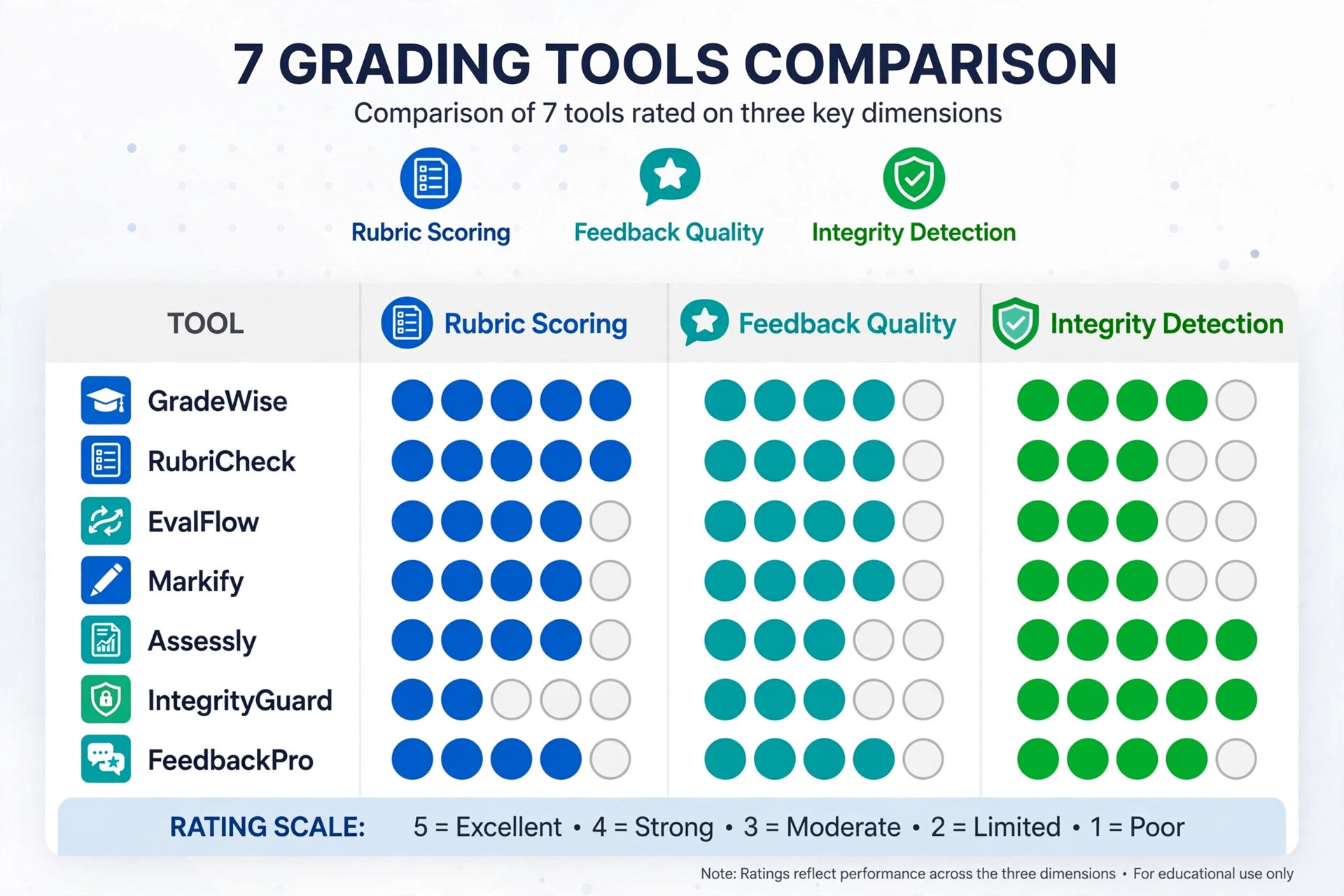
Most roundups rank these tools on feature lists. That misses the point. A tool can be excellent at drafting feedback and mediocre at scoring, or strong at scoring typed essays and useless on handwriting. So this guide splits every tool into three separate axes: rubric scoring, written feedback quality, and integrity detection. Judge each axis on its own, because a tool that wins one often loses another.
How This Guide Was Researched
Prices were checked against vendor pages in October 2026, and where vendor pages disagree — with each other or with third-party roundups — this guide flags the contradiction instead of picking one number silently. Competitor roundups were cross-checked against vendor documentation and user reports to describe how each tool handles real classroom work. No vendor paid for placement, and no vendor marketing claim is repeated here without a check.
The 7, At a Glance
| Tool | Best for | Assigns scores? | Free tier | Paid from |
|---|---|---|---|---|
| CoGrader | Typed essays, Google Classroom | Yes | 100 submissions/mo (see cap warning) | $15/mo billed annually |
| EssayGrader | Essay volume, big rubric library | Yes | ~50 essays/mo, 1,000-word cap | $6.99/mo |
| Gradescope | Handwritten + exam batches, large classes | Human assigns every point; AI groups answers | Basic plan, limited features | Institutional quote |
| Brisk Teaching | Feedback inside Google Docs | No — feedback only | Free forever, 20+ tools | Schools/districts, custom |
| Class Companion | Practice + revision loops, instant feedback | Yes, with teacher override | Free for individual teachers (cap unpublished) | Schools/districts, custom |
| Formative (with Luna) | In-class formative assessment | Yes, auto-grading + suggested scores | Free incl. Luna AI, basic auto-grading | $20.75/mo billed annually |
| MagicSchool AI | Feedback + planning in one toolbox | No — comments only | Free, generation limits | $12.99/mo or $8.33/mo billed annually |
Prices verified: October 2026.
How to Judge Any Grader: Three Axes, Not One Score
Before the reviews, lock in this split. Every tool below gets judged on the same three axes.
Rubric scoring. Does it apply your criteria and return a defensible number? Check whether each criterion score comes with evidence quoted from the student’s work. A number with no evidence is a guess with formatting.
Written feedback quality. Does the comment tell the student what to change? Useful feedback points at a specific passage and names the next step. Generic feedback (“add more examples,” “strengthen your conclusion”) tells you the tool skimmed.
Integrity detection. Does it flag copied or AI-generated text, and how much should you trust the flag? Detection signals are probabilistic. They are a starting point for a conversation, never proof, and never a reason to change a grade on their own.
Keep those three apart and most of the marketing confusion disappears. A tool that writes good comments but assigns no scores (Brisk, MagicSchool) is not worse than a scorer. It does a different job.
1. CoGrader — Best for Typed Essays in Google Classroom
CoGrader is a dedicated essay grader built around one workflow: pull assignments from your LMS, grade the class set against your rubric, review every draft, then send feedback back through the same system.
It connects to Google Classroom, Canvas, and Schoology, and it grades handwritten essays from uploaded images and scans as well as typed work. Canvas/Schoology availability varies by tier — confirm whether your plan includes them before buying. Some roundups still say CoGrader doesn’t handle handwriting — that’s outdated; the current product includes a handwriting workflow (confirm whether it sits on your tier). You can upload your own rubric, pick from a library aligned to state standards, AP, IB, and Cambridge, or generate one from a description. Feedback comes in formats teachers already use — Glow and Grow, Two Stars and a Wish, TAG, and others — and every score and comment stays editable until you approve it.
Rubric scoring: strong. Scores arrive criterion by criterion, with comments tied to passages in the student’s writing. That evidence link is what makes review fast: you can check the reasoning instead of re-reading the whole essay.
Written feedback quality: strong. The feedback formats are classroom-ready, and the class dashboard shows which criteria the whole class missed — useful for planning the next lesson.
Integrity detection: available on school and district plans (AI and plagiarism detection). On individual plans, treat integrity as a separate job.
The free-cap warning: CoGrader’s own pages disagree with each other. Its blog lists the free Starter plan at 150 submissions a month plus 90 days of premium access. Its pricing page lists 100 submissions a month plus a 14-day trial. The paid Standard plan is consistent across pages: $15 a month billed annually, or $19 month to month, for 350 submissions a month, plus grammar checking and a class performance dashboard. Check the live pricing page the day you sign up and screenshot it.
Use it for: English, humanities, and social studies teachers grading typed essay batches in Google Classroom.
2. EssayGrader — Best for Essay Volume and Rubric Choice
EssayGrader is the other dedicated essay grader, and its selling point is breadth: more than 500 pre-built rubrics covering state standards, AP, IB, and Cambridge, plus custom rubrics and bulk upload. It integrates with Google Classroom, Canvas, and Schoology. Canvas/Schoology availability varies by tier — confirm whether your plan includes them before buying.
Rubric scoring: strong for writing. Criterion-level scores with error reports that are easy to share with students. Bulk upload suits a department grading a full year group at once.
Written feedback quality: strong. Detailed, criterion-linked comments, plus an essay summarizer for getting the shape of a long paper quickly.
Integrity detection: built in on higher plans — AI detection and plagiarism checking arrive at the Premium tier, not the free one.
The free-cap warning: EssayGrader’s free numbers are the messiest in this guide. Its own pages have listed 25, 50, and 100 free essays a month at different times, and independent roundups disagree too. Treat 50 a month with a 1,000-word cap per essay as the working figure and verify it at signup. The most recent third-party check (Coursebox, Oct 2026) lists 100/mo, so the figure may have moved upward — verify at signup. The word cap matters more than the count: a long high-school argumentative essay can run past 1,000 words, so the free plan fits short responses better than full papers. Paid plans run $6.99, $14.99, and $34.99 a month for 100, 350, and 800 essays, with word caps of 2,000, 3,500, and 8,000 words per essay.
Use it for: teachers who grade a lot of writing and want a large rubric library without building every rubric from scratch.
3. Gradescope — Best for Handwritten Work and Exam Batches
Gradescope, owned by Turnitin, works differently from the essay graders above. Its AI does not assign scores. It groups similar answers together so you grade one response and apply that score and comment to the whole group. A human assigns every point.
That distinction matters. On a 200-paper exam with short, convergent answers, grouping removes most of the repetition. On a long-form research essay, it helps far less, because the writing feedback stays generic compared with rubric-based essay tools.
It handles the widest range of formats here: fixed-template exams, handwritten work (students submit via the mobile app or you scan paper), bubble sheets, and code assignments with autograding. Rubric changes propagate back across work you already graded. Integrations cover Canvas, Blackboard, Brightspace, Moodle, and Sakai.
Rubric scoring: you do the scoring; the tool does the sorting. That is a feature, not a weakness, for exam marking — but it means Gradescope never closes out a grading batch on its own.
Written feedback quality: functional for exam-style comments, thin for essay-style coaching. Expect rubric comments applied at scale, not personalized revision guidance.
Integrity detection: not included. Turnitin’s plagiarism and AI-writing detection live in Feedback Studio, a separate product sold separately. If your school already licenses Turnitin, ask whether Feedback Studio is part of your contract — it is the institutional route to feedback plus integrity checking in one workflow.
Pricing: a free Basic plan with limited features exists, and full access is institutional pricing by quote. There is no published per-teacher price. One roundup cites $1–$3 per student per course, but that figure could not be verified against a vendor page, so do not budget on it.
Use it for: university departments, large secondary classes, and any teacher grading exam batches with handwritten or mixed-format answers.
4. Brisk Teaching — Best for Feedback Inside Google Docs
Brisk is a Chrome and Edge extension that works inside the documents you already use — Google Docs, Slides, Forms, and Word Online — rather than a separate grading platform. You open a student’s Doc and run feedback in formats like Targeted Feedback, Glow & Grow, Rubric Criteria Feedback, and Next Steps. A Batch Feedback tool in the web experience handles a folder of assignments at once.
Rubric scoring: none. Brisk states plainly that it does not produce scores or grades. If assigning points is the job, this is not the tool.
Written feedback quality: strong for its lane. Because it works where the writing lives, the feedback lands as targeted comments on specific passages instead of a separate report. Its Inspect Writing tool replays how a document was produced — timestamps, typing, edits, pasted text — which tells you more about authorship than any detection score.
Integrity detection: Inspect Writing shows process evidence (what was typed, pasted, or edited and when). Treat that as evidence to discuss with the student, not as an automated verdict.
Pricing: the Educator Free plan is free forever with 20+ tools, and new accounts get 14 days of the Schools & Districts plan before dropping to free. Brisk’s own FAQ page now lists paid access as a Schools & Districts plan with custom pricing — the individual Educator Pro tier that third-party roundups still cite at $99.99 a year no longer appears on Brisk’s FAQ page. Confirm current paid options on the vendor page before budgeting.
Use it for: teachers who live in Google Docs and want faster, better comments on drafts and revisions — not final grades.
5. Class Companion — Best for Practice and Revision Loops
Class Companion is an assignment platform, not a batch grader you point at a finished stack. Teachers post practice tasks, students respond, the AI returns feedback immediately, and students revise. The whole class shows up in one view. Panorama Education acquired it in April 2025, and it now sits inside Panorama’s Solara product line.
That loop is the point. Students get feedback while the assignment is still fresh, instead of waiting a week for a marked paper they no longer care about. It supports written work across subjects — English, social studies, science, world languages — and covers AP formats including AP Psychology and AP US History DBQ, LEQ, and SAQ work.
Rubric scoring: yes, with teacher override. Teachers review and adjust AI-generated scores and can leave notes, and students can review and dispute scores — feedback becomes a conversation rather than a verdict.
Written feedback quality: strong for practice work. Feedback is immediate and revision-oriented, which is exactly what a practice loop needs.
Integrity detection: on the free plan, teachers see text students pasted into a response. Deeper response-integrity detection — typing anomalies, leaving the tab, similarity across students — sits in paid school and district plans.
Pricing: free for individual teachers, with a cap the company does not publish. School and district pricing is by quote. Ask about the free cap before building a weekly routine on it.
Use it for: teachers who want students revising against feedback during the unit, not just receiving a grade after it.
6. Formative (with Luna) — Best for In-Class Formative Assessment
Formative is a real-time assessment platform. Students answer as you watch, and Luna, its AI assistant, auto-grades multiple-choice, true/false, matching, and fill-in-the-blank questions on submission. For open-ended responses, Luna groups similar answers so you grade them in batches, and it can suggest scores based on your past grading.
The real-time view is the reason to pick it. You can see who is stuck during the lesson and intervene before the period ends. That makes Formative a formative assessment companion first and an end-of-unit grader second.
Rubric scoring: yes on paid plans — advanced grading and feedback with customizable rubrics. The free plan includes basic auto-grading.
Written feedback quality: solid for short answers and in-the-moment correction. It is not built for long-form essay coaching.
Integrity detection: the paid plans include built-in anti-cheating features. Detection is not the product’s focus; classroom monitoring is.
Pricing: the free plan includes Luna AI, real-time responses, unlimited activity creation, and basic auto-grading, with no credit card required. The Classroom plan for an individual teacher is $20.75 a month billed annually ($249 a year), adding advanced grading and feedback, customizable rubrics, and secure assessment tools. A Small School plan covers up to 250 students at $260.42 a month billed annually, and district pricing is custom. All figures from Formative’s own plans page.
Use it for: teachers who want live insight into understanding during class — exit tickets, quick checks, and in-lesson intervention.
7. MagicSchool AI — Best as a Feedback Tool Inside a Wider Toolbox
MagicSchool is a teacher toolbox with 80+ tools covering lesson planning, differentiation, family communication, quizzes, and writing feedback. Its Writing Feedback tool returns criteria-based comments you edit before sharing. For lesson planning help, see our guide to AI lesson plans for teachers.
Rubric scoring: none. Like Brisk, MagicSchool writes comments and does not assign points. Its grading features only go as far as feedback on individual pieces of work.
Written feedback quality: good for single assignments and drafts. You paste or upload a response, get criteria-based comments, and edit them. It is not a batch grader — there is no class-set workflow with gradebook return.
Integrity detection: none built in. If you need detection, pair it with another tool.
Pricing: free with generation limits across all tools. Plus is $12.99 a month, or $8.33 a month billed annually, for unlimited generations, output history, and exports. Enterprise is custom.
Use it for: teachers who want one subscription covering planning, differentiation, communication, and light feedback — and who grade scores elsewhere.
Worth Knowing: GradingPal (Bulk + Handwriting)
GradingPal is the bulk-grading option three competing roundups cover that the seven tools above don’t. Teachers upload assignments in any format — essays, worksheets, quizzes, exams, problem sets, lab reports, diagrams, even video and audio reflections — and the platform reads handwritten or typed responses with OCR, applies a customizable rubric, and returns scores with partial credit plus detailed feedback. Every result stays editable: override scores, rewrite comments, or add personal notes before anything reaches students.
The pricing, checked on GradingPal’s own pricing page: Free covers 50 submissions a month with handwriting support, custom rubrics, and Google Classroom integration. Lite is $14 a month billed annually ($19 month to month) for 250 submissions a month, covering writing, presentations, and art — quizzes, exams, and worksheets need an add-on. Pro is $26 a month billed annually ($35 month to month) for unlimited submissions, all assignment types, and performance analytics. Canvas and Schoology sit on school plans only; individual plans connect to Google Classroom. AP-aligned rubrics are available through the standards library.
Pick GradingPal when your grading load is mixed-format bulk — a stack of handwritten worksheets plus essays plus a quiz — and you need one workflow for all of it. For pure essay batches, CoGrader or EssayGrader remain the tighter picks.
Free AI Grading Tools: What “Free” Actually Buys
Free tiers differ more than the marketing suggests. The table below shows what each free plan actually includes, based on vendor pages checked in October 2026.
| Tool | Free allowance | Handwriting on free? | Scores on free? |
|---|---|---|---|
| CoGrader | 100 or 150 submissions/mo — vendor pages disagree | Included per vendor blog; confirm at signup | Yes |
| EssayGrader | ~50 essays/mo, 1,000-word cap | Not confirmed on free | Yes |
| Gradescope Basic | Limited features, small courses | Yes | Human-assigned (grouping limited) |
| Brisk Teaching | Free forever, 20+ tools | Not the focus | No — feedback only |
| Class Companion | Free, cap unpublished | Not stated | Yes |
| Formative | Free incl. Luna AI, basic auto-grading | Not the focus | Basic auto-grading |
| MagicSchool | Free, generation limits | Not the focus | No — feedback only |
Three patterns to watch. Monthly caps run out mid-unit: a teacher with 120 students and one essay a month blows past 100 before the first week ends. Per-item limits quietly exclude the work you most want graded — EssayGrader’s 1,000-word cap is the clearest example. And feature gates decide what you actually get: handwriting, LMS import, and detection are commonly paid features. Trials that revert feel generous for two weeks and then change your workflow. Check the plan page the day you sign up and screenshot it.
Handwritten vs Typed: Two Different Jobs
Typed essays and handwritten pages fail in different places, so test them separately.
Typed work goes straight to scoring and feedback. The only question is whether the tool follows your rubric. Handwritten work adds a reading step first: the tool must transcribe the page correctly before it can grade anything. A transcription error becomes a scoring error, and the tool will not flag it as one.
That is why Gradescope fits handwritten exam batches — its grouping workflow keeps a human assigning every point, so a misread answer gets caught when you grade its group. Essay-focused tools like CoGrader do handle handwritten uploads, but confirm whether handwriting sits on your plan: on CoGrader it has moved between free and paid tiers across different pages. And never test a handwriting tool on clean sample pages. Test it on real, messy student work — the page with crossed-out lines, cramped margins, and a diagram in the corner. Clean samples tell you nothing.
Student Privacy: Check Before You Upload
Student work contains names, writing samples, and sometimes accommodations. Treat it differently from text you would paste into a chatbot. The table below shows what each vendor states. “Not stated” means the claim could not be verified on the vendor’s pages checked for this guide — not that the vendor fails the standard.
| Tool | FERPA | COPPA | SOC 2 | Trains on student data? |
|---|---|---|---|---|
| CoGrader | Stated | Not stated | Type 1 (per privacy policy) | No — vendor policy prohibits it |
| EssayGrader | Stated | Not stated | Not stated | Not stated |
| Gradescope (Turnitin) | Stated | Stated | Not stated | Check your contract |
| Brisk Teaching | Stated | Stated | Type 2 | Not stated |
| Class Companion (Panorama) | Stated | Stated | Type II | No — district data never used to train |
| Formative | Not stated | Not stated | Not stated | Not stated |
| MagicSchool | Stated | Stated | Type 2 | No — contractually prohibited |
Five questions to ask any vendor before uploading real student work: Is student data used to train AI models? Where is it stored, and for how long? Will the vendor sign a data privacy agreement? Can you strip names before uploading? What does your school or district policy allow? If you are unsure on any of them, test with anonymized or already-graded sample work first.
One caution on “FERPA compliant” badges: FERPA governs how schools handle education records, and a vendor’s badge does not replace your district’s contract. If your district requires a signed data privacy agreement, get it signed before the pilot, not after.
Can AI Grading Be Trusted? Accuracy and Bias, Honestly
Published evidence for scoring accuracy is thin. Most vendors publish no scoring data you can check at all. The few numbers that do circulate are either vendor claims with no methodology or measurements of something else — a handwriting transcription figure is not a scoring figure, and an aggregate “variance” number with no per-subject breakdown tells you nothing about your subject.
What that means in practice: accuracy depends on the assignment and the rubric. Objective work with an answer key is easy. An essay weighing argument and evidence is not. A detailed rubric with explicit descriptors for each level produces better output than a vague one, because the tool has something concrete to hold each submission against.
Bias is the second concern. AI graders learn from training data that reflects dominant language patterns, so they can undervalue writing that does not match those patterns — including work from English language learners and students writing in non-standard dialects. Detection tools carry the same risk: a flag that fires more often on non-native writing is not evidence of misconduct. The practical defense is the same as for accuracy: review every score, watch for drift on individual criteria, and never let a detection percentage decide a grade.
One workflow worth knowing combines grading and integrity in a single pass: GPTZero’s AI Grader pairs rubric-based grading with its detection in the same workflow — upload your own rubric or use a built-in template, review and edit every AI-suggested comment before sharing it with students, and run the same submission through detection without switching tools. It integrates with Google Classroom, Canvas, and Moodle. If your school already uses GPTZero for detection, adding its grading side is a natural extension; if you don’t, it is not a reason to buy detection alone.
The Same-Essay Test: A Protocol You Can Run in an Hour
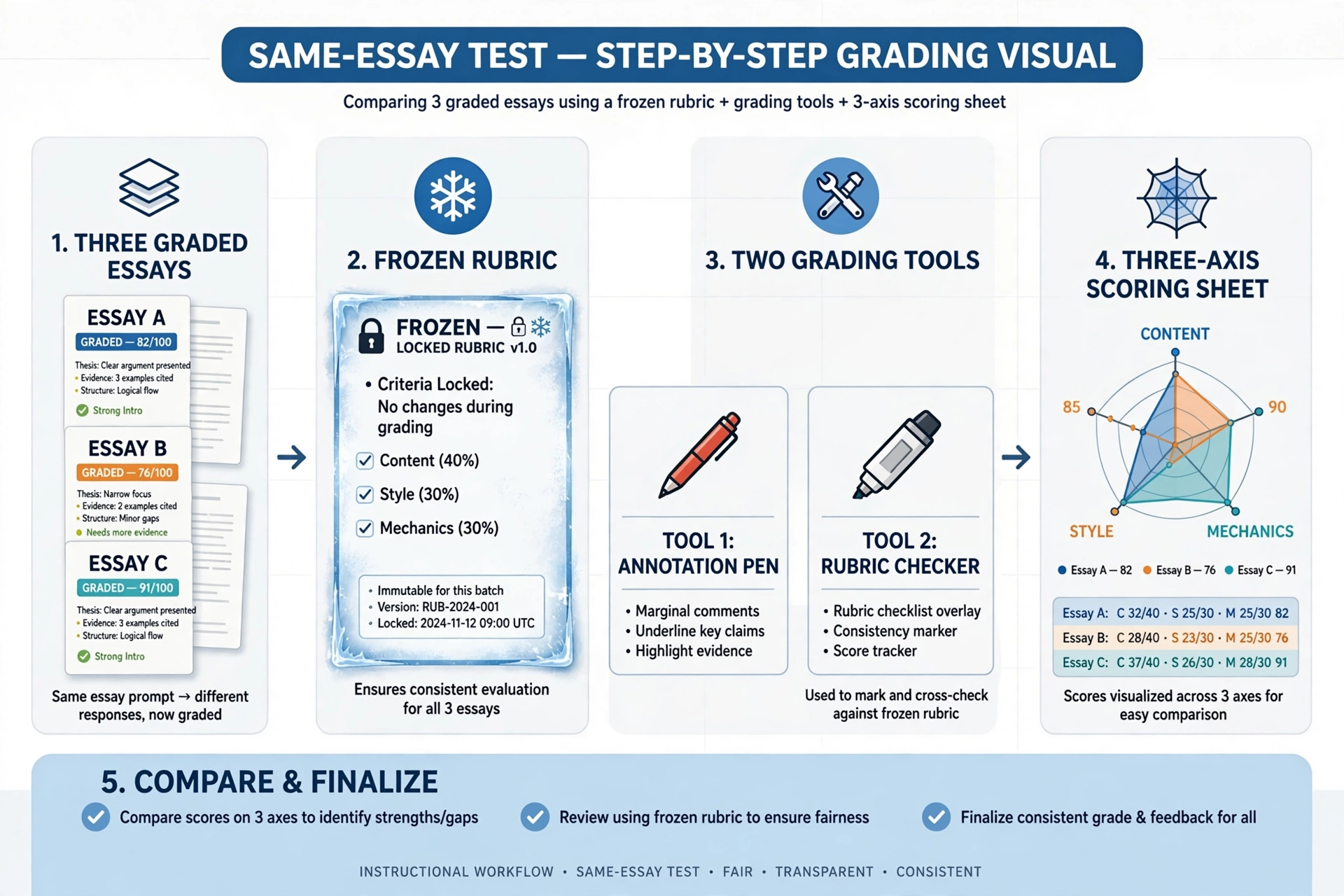
No roundup we read ran the same essay through competing tools on the same rubric. So here is how to run that test yourself before committing to any tool.
- Pick three essays you already graded by hand. Choose one strong, one borderline, and one weak paper. Include one with a subject-specific error — a plausible but wrong explanation — since that is where graders fail most often.
- Freeze your rubric. Use the exact rubric you graded them with. Do not let any tool rewrite or “improve” it during the test, or you are no longer comparing tools.
- Run the same three essays through two or three tools. Use the same rubric file and the same assignment prompt in each. Note the time each tool takes, including your review time — first-pass generation time alone hides most of the work.
- Score each tool on the three axes separately. For rubric scoring: are its scores within one rubric level of yours on each criterion? For feedback: does the comment quote real evidence from the essay, and does it name a revision the student can actually make? For integrity: if the tool flags anything, is the flag backed by evidence you can inspect?
- Check for drift. Does the tool score one criterion high on every paper? Does it reward length or polish over content? Does it handle the off-topic or incorrect paper correctly, or does it praise fluent writing that says the wrong thing?
- Check the return path. Amend one score, approve the feedback, and follow it into your gradebook or LMS. A tool that saves ten minutes of grading but costs ten minutes of copying grades back has saved you nothing.
- Decide on the disagreements, not the average. A tool that matches you on two papers and invents a score on the third is not “mostly accurate.” Record where it disagreed and why, and decide whether you can live with that failure mode.
If a tool fails step 4 — right number, wrong reason — drop it. A right number for the wrong reason will fail you on the next assignment.
What NOT to Use AI Grading For
Some grading decisions should stay fully human.
High-stakes finals and placement decisions. Use AI for a first pass if you like, but the final score on work that decides a grade, a placement, or a graduation outcome needs your judgment on the full paper.
Accommodations and IEP-related judgments. A tool does not know a student’s accommodations, learning plan, or growth over the semester. Do not let a score override what you know about the student.
Sensitive feedback. Comments about effort, behavior, or a student’s personal circumstances should come from you. Students can tell when feedback is automated, and a generic comment on a sensitive piece of work does real damage to trust.
Authorship verdicts. Detection flags — inside a grader or standalone — are probabilistic signals. They support a conversation with the student. They are not proof of misconduct, and they should never convert directly into a deduction. Authorship detection deserves its own evaluation; treat it as a boundary here, not a feature to shop for.
Final grades without review. If a tool pushes grades straight to students with no review step, do not use it. Every tool in this guide keeps a review step — keep it that way in your workflow too.
The Human-Review Workflow That Keeps You in Charge
The tools save time on the first pass. Your job is the review pass, and it needs a routine.
Start on assignment day: write or paste your rubric and run three already-graded papers through the tool. When the batch comes in, let the tool draft scores and comments. Then read every score, starting with the lowest and highest — those are where errors hide. Rewrite the top two comments per student so they sound like you and refer to something specific in that student’s work. Note which rubric criterion caused the most trouble and use it in tomorrow’s lesson. Tell students you use AI as part of grading, and what the AI does versus what you do. That honesty strengthens trust instead of undermining it.
Generic Chatbot vs Dedicated Grader
A general chatbot like ChatGPT can grade: paste an essay, paste your rubric, get a score breakdown with feedback per criterion. It works best as a drafting aid — testing rubric wording, getting a second opinion on a tricky paper, or generating sample feedback. Our full review covers what ChatGPT does well and where it falls short; see our ChatGPT review.
For real class sets, a dedicated grader wins on workflow, not intelligence. It stores your rubrics, pulls submissions from your LMS, keeps a review queue, tracks class patterns, and returns feedback through the system students already use. A chatbot makes you rebuild that pipeline by hand for every batch — re-pasting the rubric, re-uploading files, re-copying comments back into Classroom one student at a time. Use chatbots to think. Use dedicated graders to process.
One related tool worth knowing about: Grammarly’s AI Grader estimates a grade and gives feedback on a draft — but it is built for students revising their own work, not for teachers grading a class. Its free tier gives one grade prediction with three pieces of feedback per day, and it has no instructor-facing side. Do not buy it expecting a classroom grader. Our full Grammarly review covers the wider product.
Pick by What You Grade
| Your main grading load | Start here | Decide on |
|---|---|---|
| Typed essays in Google Classroom | CoGrader or EssayGrader | Free-cap fit, rubric library, return path |
| Handwritten exams, large batches | Gradescope | Institutional access, grouping workflow |
| Feedback inside Google Docs | Brisk Teaching | Comment quality, no scores needed |
| Practice + revision loops | Class Companion | Free-cap fit, subject coverage |
| In-class checks and exit tickets | Formative | Real-time view, rubric grading on paid plan |
| Feedback + planning in one tool | MagicSchool | Breadth over grading depth |
| Feedback + integrity in one institutional workflow | Turnitin Feedback Studio (via school license) | What your contract actually includes |
| AP free-response questions (FRQs) | Fiveable | Per-FRQ tuning, stimulus handling |
Grading AP Work: A Different Job
If you teach AP, the general-purpose graders above will disappoint you in one specific way: they carry AP presets — a rubric labelled for AP Lang or APUSH — but they don’t tune scoring per free-response question type, and they don’t read the stimulus. A DBQ without the documents, or a graph-analysis FRQ without the graph, gets scored on the prose alone. For AP, that misses the point.
Fiveable is built for this job. It scores AP free-response questions across 37 AP subjects with scoring tuned per FRQ type — DBQs, LEQs, SAQs, synthesis essays, rhetorical analysis, experimental design, data analysis — and it processes stimulus materials (graphs, images, document sets, data tables) as part of scoring, which no general grader in this guide does. Teachers review every score one at a time and can adjust any rubric point; Fiveable publishes what teachers kept vs. changed — 96.2% of reviewed FRQ responses kept Fiveable’s score exactly — with the caveat that these are teacher-kept scores in real classrooms, not an independent accuracy study and not a comparison with College Board scoring. Pricing is $29 a month with a 7-day trial (Teacher Workspace at $129 a year adds bulk grading). It does not integrate with Canvas or Schoology.
Class Companion also covers AP work — AP Psychology and AP US History DBQ, LEQ, and SAQ formats — inside its practice-and-revision loop (see §5). It does not publish per-subject scoring data, and its full AP subject list is not published, so confirm your subject is covered before building a unit on it.
GradeWithAI names specific AP tasks where most tools list only “AP English”: AP Lang and AP Lit essays, APUSH and AP World DBQs and LEQs, AP Seminar IRR and IWA, and AP Physics FRQs. It scores one AP response at a time against the published rubric for that task. It publishes no scoring data and no evidence of stimulus handling for DBQ document sets. Pro is $20 a month; the free tier covers 25 AI requests a month — less than one class set.
GradingPal (see the box above) carries AP-aligned rubrics in its standards library, but it does not tune scoring per FRQ type the way Fiveable does.
The rule for AP: if the exam scores the stimulus, your grader must read the stimulus. Only Fiveable in this guide does. If your AP work is mostly practice essays without stimulus, CoGrader or EssayGrader with AP rubrics will serve — but check the output against the College Board rubric yourself, because a generic engine can award credit for well-shaped prose that misses the point the FRQ actually asks.
Frequently Asked Questions
What is the best AI grading tool for teachers?
It depends on what you grade. For typed essays, CoGrader and EssayGrader are the strongest dedicated options with usable free tiers. For handwritten exams and large batches, Gradescope is the strongest — usually through an institutional license. For feedback without scores, Brisk Teaching (inside Google Docs) and MagicSchool (inside a wider toolbox) are the practical picks.
Are there free AI grading tools for teachers?
Yes, with real limits. CoGrader and EssayGrader both offer free plans with monthly submission caps and, for EssayGrader, a per-essay word cap. Brisk Teaching is free forever for feedback. Class Companion is free for individual teachers with an unpublished cap. Formative’s free plan includes Luna AI with basic auto-grading. Gradescope’s Basic plan is limited. Check the live pricing page before building a routine around any free tier, because caps change.
Can AI grade essays accurately?
It can draft scores and feedback that are useful on a first pass, but accuracy depends on the rubric, the subject, and the submission. Most vendors publish no scoring data you can check. The only reliable answer is your own test: run already-graded essays through the tool on your rubric and compare criterion by criterion. Keep a human review step before any grade reaches a student.
Is AI grading safe for student data?
It depends on the vendor and your district’s rules. Check whether student data trains AI models, how long work is stored, whether the vendor will sign a data privacy agreement, and whether you can strip names before uploading. CoGrader and MagicSchool state they do not train on student data; Class Companion’s parent company says the same for district data. For other tools, the answer was not stated on the pages checked for this guide. When unsure, test with anonymized work first.
Does AI grading replace teacher judgment?
No. Every tool in this guide is built to draft scores and feedback for a teacher to review, adjust, and approve. The final call stays with you — especially on high-stakes work, ambiguous answers, students with accommodations, and sensitive feedback. The time saving comes from the first pass, not from skipping the second one.
The Bottom Line
Pick two tools from the table above that match what you actually grade, and run the same-essay test this week. Keep the one whose failures you can spot and live with, because every grader fails somewhere — the question is whether its failures are visible to you before a student sees them. And keep your rubric sharp: the clearest rubric wins more accuracy than any tool switch.