

Quick answer: For most people, Google’s image model inside the Gemini app is the right starting point — free, consistent, and good with text. Midjourney still sets the ceiling for pure artistic quality, ChatGPT’s image model is the easiest way to iterate in conversation, and Adobe Firefly is the one you can hand to a legal team. Ideogram wins anything with words in it, Leonardo wins control, and Flux wins if you want to run a model yourself.
This is the parent guide to our image-generator coverage — the “best overall” view across free and paid. If you only care about free tiers, our best free roundup goes deeper there.
Prices and limits checked against vendor pages and current pricing analyses in October 2026. They change often — confirm before you subscribe.
The 7, at a Glance
| # | Tool | Best for | Free tier | Paid from | Watch out for |
|---|---|---|---|---|---|
| 1 | Google Gemini (Nano Banana) | Most people, free | Yes, in the Gemini app | Google AI plans from ~$4.99/mo | Fewer pro controls |
| 2 | Midjourney | Artistic ceiling | No | $10/mo | Weak text; public by default |
| 3 | ChatGPT (GPT Image) | Conversational editing | Limited | $8/mo (Go) / $20/mo (Plus) | Usage caps |
| 4 | Adobe Firefly | Commercial safety | Limited credits | ~$9.99/mo | Less wow-factor |
| 5 | Ideogram | Text in images | Yes, slow queue, public | ~$20/mo (Plus) | Narrow outside text |
| 6 | Leonardo AI | Control and variety | 150 tokens/day, public | $12/mo | Learning curve |
| 7 | Flux | Self-hosting and APIs | Open weights, free locally | Pay-per-image hosted (~$0.01–0.10) | Technical setup |
1. Google Gemini (Nano Banana): The Default Pick
Google’s image model — the one people call Nano Banana — is the strongest free starting point in this category. It’s the most consistent performer across independent same-prompt tests in 2026: illustration accuracy, photorealism, and prompt-following all land near the top, and it handles multi-part requests (“three people, one holding a blue mug, on the left”) without scrambling the details.
It’s free inside the Gemini app with a Google account — no separate signup, no credit card — and it produces a usable image more often per attempt than most rivals, which matters more than peak quality on a deadline. Higher limits and faster speeds come with Google’s paid AI plans, starting around $4.99 a month.
The honest limits: fewer levers for fine art direction than Midjourney’s parameter system, and images generated in the Gemini app carry a visible watermark. If you’re an illustrator chasing one perfect frame, you’ll feel the ceiling. Everyone else won’t.
Use it for: everyday generation, mockups, realistic scenes, blog visuals.
2. Midjourney: Still the Artistic Ceiling
For sheer look-and-feel, Midjourney remains the one to beat. Its images have a cinematic, painterly coherence that reads as art-directed rather than generated, and experienced users can steer it hard with parameters, style references, and character references.
The trade-offs are real. There is no free tier; plans run $10 to $120 a month (Basic around $10 for roughly 200 image jobs, Standard $30, Pro $60, Mega $120). Images are public by default on the lower plans — private generation needs the pricier tiers. And text rendering is its famous weak spot: independent 2026 testing put legible text at roughly 30–40% accuracy, so anything with words in it goes elsewhere.
Use it for: hero art and concept work. See our Midjourney review and Midjourney vs DALL-E.
3. ChatGPT (GPT Image): The Easiest Way to Iterate
OpenAI’s image model lives inside ChatGPT, and that placement is the whole argument. You describe an image, then refine it in plain conversation: warmer light, different angle, remove the thing in the corner. It also follows complex instructions well and handles text better than Midjourney does.
The ceiling is lower than the specialists, and heavy image use runs into plan caps fast. Generation is bundled into ChatGPT plans — Go at $8 a month, Plus at $20 — with a limited free tier for light use.
Use it for: quick visuals and thumbnails when you already pay for ChatGPT.
4. Adobe Firefly: The One Legal Teams Like
Adobe trained it on licensed Adobe Stock and public-domain content, which makes its output far safer to ship for paying clients than models trained on scraped data of murky provenance. It also lives inside Photoshop, Illustrator, and Express — generative fill and background replacement where designers already work.
On pure photorealism and creative drama it trails Nano Banana and Midjourney. You don’t pick Firefly for the single most jaw-dropping render; you pick it so nobody has to ask about licensing again. Limited free tier, paid plans from around $9.99 a month.
Use it for: client work and ad creative where provenance matters.
5. Ideogram: The Text Specialist
Every other tool here struggles with words inside images. Ideogram was built for exactly that job: in side-by-side 2026 testing it rendered text accurately around 90–95% of the time, versus roughly a third for Midjourney. Posters, logos, thumbnails with titles, signage — if the image IS the text, start here. It has a useful free tier on a slow queue, and — unusually — grants full commercial rights even on free generations. The catch on free: images are public by default, so keep confidential brand work off it until you pay. Paid plans start around $20 a month for Plus.
Outside typography its general range is solid but not class-leading. Nano Banana Pro has narrowed the gap on shorter strings, but for complex typographic layouts Ideogram is still the safest bet.
Use it for: posters, logos, thumbnails — anything with readable text.
6. Leonardo AI: Most Control on a Budget
Leonardo is for people who want to steer: models, style presets, reference images, resolution controls, canvas editing — the deepest toolkit for dialing in a specific look without paying Midjourney prices. It grew up in game art: characters, environments, stylized series work. The free tier hands you 150 tokens a day (roughly a handful of standard images), and paid plans start at $12 a month.
The learning curve is the steepest on this list, and free-tier images are public by default. See the Leonardo AI review and Leonardo vs Midjourney if you’re deciding between the two.
Use it for: game assets, character design, stylized series work.
7. Flux: The One You Can Own
Flux, from Black Forest Labs, is the open-weight quality leader — the model you can download, self-host, and fine-tune on your own data. That makes it the pick for developers embedding generation in their own software. Photorealism is genuinely strong, and hosted API access runs roughly $0.01–0.10 per image depending on the variant, which is cheap at scale.
The catch is the obvious one: there’s no polished consumer app holding your hand. You run it yourself or call it through an API. For a non-technical marketer that’s a wall; for an engineer it’s the entire point.
Use it for: products, pipelines, and fine-tuning on your own data.
How to Actually Choose
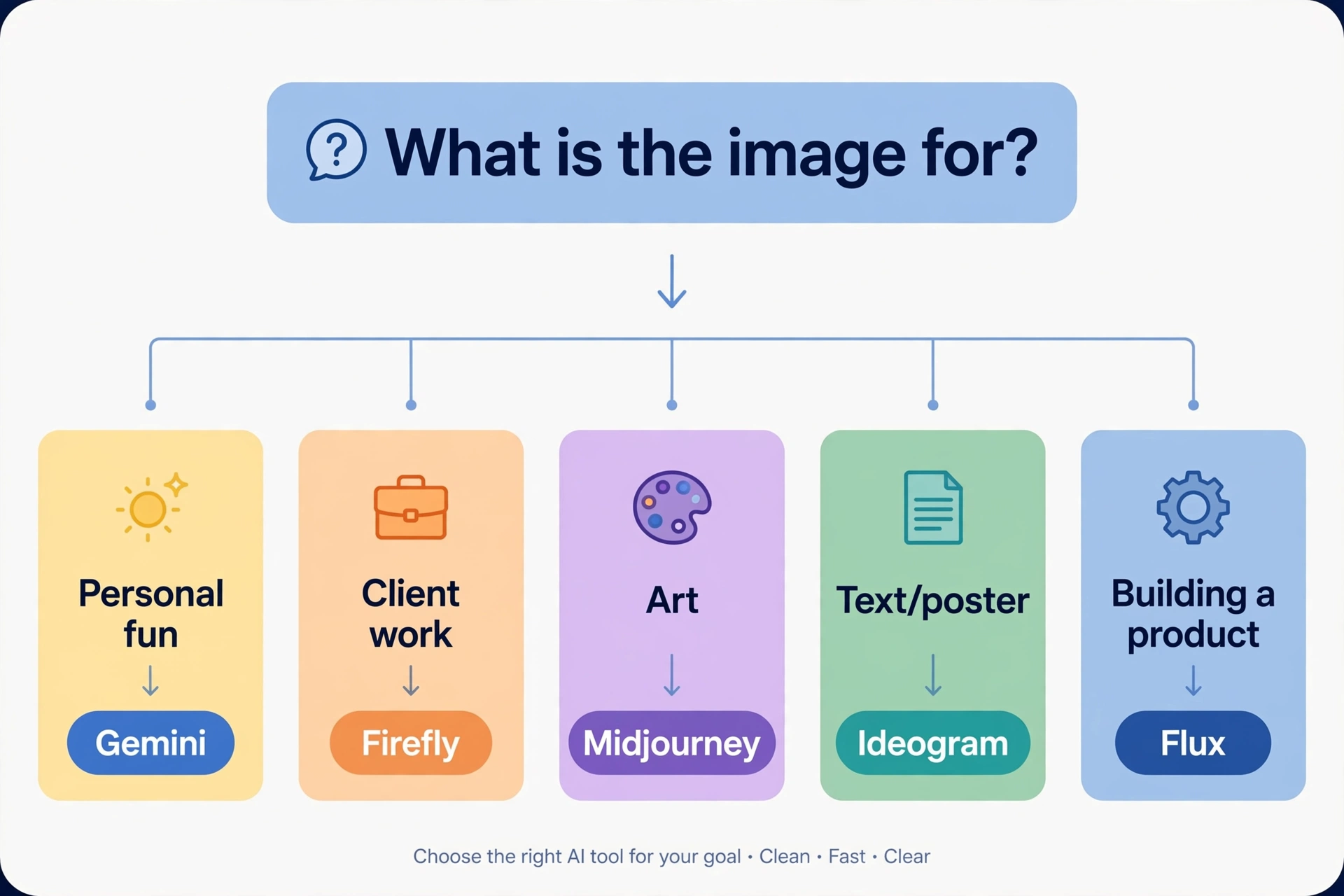
Match the tool to the job:
- Good images, free: Gemini. Start here, and only leave if you hit a specific wall.
- The image is the art: Midjourney. Nothing else has its aesthetic ceiling.
- You iterate in conversation: ChatGPT. The editing loop is the feature.
- It’s for a client or an ad: Firefly. Licensed training data, end of discussion.
- There are words in the picture: Ideogram. Not close.
- Control without a big bill: Leonardo. Deepest free toolkit.
- You’re building a product: Flux. Own the model.
And run two, not one: a primary for your main job, a backup for the job it fumbles (usually text or volume). When a tier tightens or a price moves, you switch in an afternoon.
What Nobody Tells You About Cost
Subscriptions hide the real math. A $10 plan that yields 200 images is $0.05 an image; a pay-per-image API at $0.08 looks cheap until you iterate 40 times on one concept. Before subscribing, estimate your monthly image count and divide. Light users (under 30 images a month) are usually better off on a free tier plus an occasional credit pack. Heavy users should price per image, not per month.
Also budget for step two. The generation is rarely the end: upscaling, fixing a hand, extending a background, adding real typography. Some of that lives inside these tools (Ideogram’s canvas, Firefly’s Photoshop integration); the rest is a separate tool and sometimes a separate bill.
Frequently Asked Questions
Which AI image generator is the best overall in 2026?
For most people, Google’s image model in the Gemini app — free and consistent. For maximum artistic quality, Midjourney. For commercial work where licensing matters, Adobe Firefly. There’s no single winner; the best one is the one that fits your job.
Which AI image generator is best for text in images?
Ideogram, by a clear margin — around 90–95% text accuracy in independent 2026 testing. For posters, logos, and anything typographic, it’s still the safest choice.
Can I use AI-generated images commercially?
Usually yes, but terms differ. Firefly is safest (licensed training data); Ideogram grants commercial rights even free; Midjourney on paid plans. One nuance: in the US you generally can’t copyright raw AI output — typing a prompt doesn’t make you the legal author. Check current terms before shipping paid work.
Which is better, Midjourney or Nano Banana?
Different strengths. Midjourney has the higher artistic ceiling and deeper art-direction controls, but costs $10+/month and fumbles text. Nano Banana is free, more consistent at following complex prompts, and better at text — but gives you fewer fine-art levers.
Is there a free AI image generator with no limits?
Not among the quality tools — every good one meters usage somehow. The closest to “plenty, free” is Microsoft Designer (practically unlimited standard-speed generations with a Microsoft account) and the Gemini app. Our best free roundup compares the free tiers in detail.
Conclusion
The 2026 image-generator market has a clear shape: a free tier good enough for most people (Gemini), an artistic ceiling worth paying for (Midjourney), a conversational middle (ChatGPT), a legally safe lane (Firefly), and specialists for text, control, and ownership (Ideogram, Leonardo, Flux). Pick by your bottleneck — volume, quality, legality, words, or control — not by a leaderboard.
Your next step: generate the same three images (a portrait, a product shot, something with text) in Gemini and in one paid tool’s trial. Ten minutes of your own comparison beats any ranking, including this one.