Best AI Cold Email Tools (2026): Deliverability First, Then Copy That Gets Replies
The tool matters less than the stack around it. Here is what cold email really costs, which tools hold up on deliverability, and how to diagnose zero replies.
Quick answer: For most senders, the best stack is a verified data source plus a flat-fee sender: Instantly Growth (about $37 a month billed annually) or Smartlead (about $39 a month) with warmup included, sending from separate domains you can afford to burn. Budget the full stack, not the sticker price: data + verification + domains and inboxes + the sender lands around $76 a month solo and $170–$200 for a small team. And if your last campaign got zero replies, the problem is usually deliverability or targeting, not the subject line — diagnose in that order.
Cold email is not a single-tool problem, and every roundup that ranks “tools” as if it were is selling you the wrong comparison. You need four layers working together: data, verification, inbox infrastructure, and a campaign tool. The campaign tool is the part most people shop for. It is also the least decisive part. A $37-a-month sender fed clean, verified contacts will outperform a $300-a-month stack fed garbage contacts every time.
The Four Layers (Buy in This Order)
Layer
What it does
What goes wrong if you skip it
1. Data
Where contacts come from — verified emails, role, industry, intent signals
Wrong people, wrong inboxes, wasted sends
2. Verification
Catches catch-all domains, spam traps, honeypots before sending
Bounces damage your domain reputation
3. Inbox infrastructure
The inboxes and domains you send from, warmed up gradually
Chaos — no follow-ups, no tracking, no replies managed
No single tool handles all four layers well. The honest way to shop is to price the stack, then pick the sender.
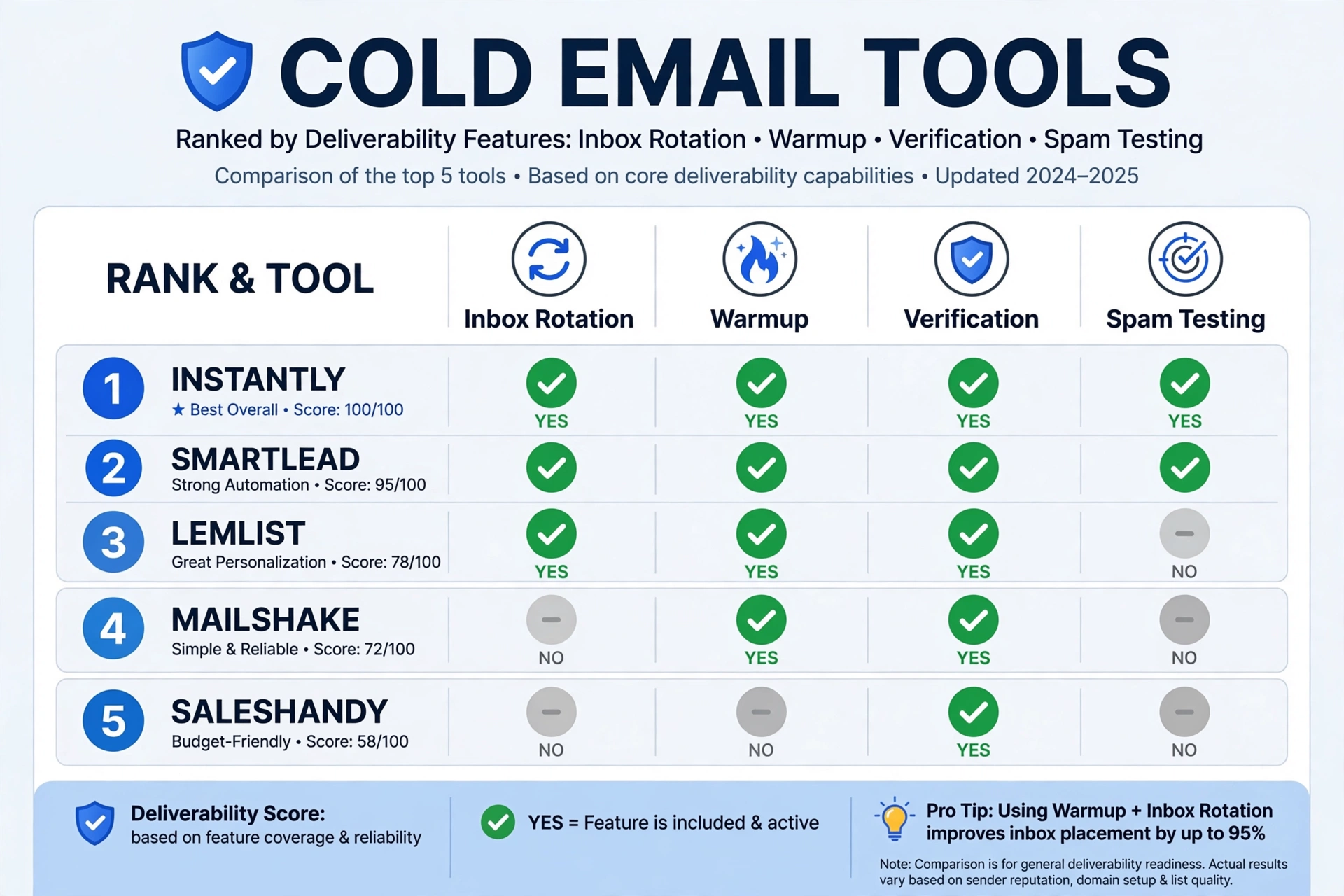
The 6 Senders Compared
Tool
Pricing model
Entry price
Unlimited mailboxes
Warmup
Database
Best for
Instantly
Flat fee
~$37/mo (annual) Growth
Yes
Yes
Separate ($47+/mo)
Volume scaling
Smartlead
Flat fee
~$39/mo ($32.50 annual)
Yes
Yes
No (SmartProspect $59/mo add-on)
Deliverability control
Lemlist
Per seat
$79/user/mo ($63 annual)
No ($9/extra inbox)
Yes ($20/user extra)
Partial
Multichannel personalization
Apollo
Per seat
$49/user/mo ($59 monthly)
Limited
Included (1 mailbox/licence covered)
Yes (210M+ contacts)
Data-first prospecting
Saleshandy
Flat fee
$25/mo (annual) Starter
Yes
Yes
No
Budget teams
Reply.io
Per seat
$49/user/mo Email Volume
No
Yes
No
Multichannel + AI SDR
Instantly — Best for Scaling Campaigns
Growth runs about $37 a month billed annually for 1,000 uploaded contacts and 5,000 emails a month; Hypergrowth jumps to $97 a month for 25,000 contacts and 100,000 emails. Unlimited email accounts and warmup come on every plan, which is why it scales: you rotate sends across dozens of inboxes instead of hammering one.
The pricing page does not make the add-ons obvious. Leads (the database) and the CRM are separate products at about $47 a month each. If you want Instantly’s database plus campaign tool plus CRM, your true minimum is around $131 a month, not the $37 headline. Skip Instantly if you run fewer than 10 inboxes or need multichannel beyond email — and note that shared infrastructure on lower tiers is a deliverability concern practitioners flag regularly.
Smartlead — The Infrastructure Play
Base starts at $39 a month (2,000 contacts, 6,000 sends); Pro runs $94 a month (30,000 contacts, 90,000 sends). Unlimited mailboxes and warmup on every plan. The add-ons are where the budget actually goes: SmartDelivery (inbox placement testing) adds $49–$599 a month, SmartServers (dedicated IP) run $39 per server a month, and SmartSenders (mailbox provisioning) cost roughly $4–$6 per mailbox a month. A realistic agency setup — Pro plus SmartDelivery plus a couple of servers — lands around $170–$200 a month before you have bought a single domain.
This is the right platform if you are an agency managing 20+ inboxes and deliverability is your competitive advantage. Solo founders sending 50 emails a day should look elsewhere.
Lemlist — Per-Seat Pricing Adds Up Fast
Email Pro runs $79 a month per user ($63 billed annually), and Multichannel Expert — which unlocks LinkedIn automation and a built-in dialer — costs $109 a month per user ($87 annually). Three users on Multichannel Expert is $261–$327 a month depending on billing, plus $9 a month per extra sending email and $20 a month per user for deliverability protection. A 3-person team easily crosses $350 a month.
The personalization features are genuinely strong — custom images, dynamic landing pages, liquid syntax. If multichannel is your strategy and you have the budget, Lemlist earns its price. If you only need email, you are overpaying for every seat.
Apollo — Great Database, Mediocre Campaign Tool
Apollo’s database covers 210M+ contacts from 35M+ companies, and for US-focused prospecting it is a solid starting point. The free plan gives 100 credits a month. Paid plans start around $49 a user a month billed annually ($59 monthly), with the Organization tier commonly requiring a 3-user minimum.
Two cautions. First, email accuracy reportedly drops to around 60–72% outside the US — good for North American prospecting, unreliable for EMEA or APAC campaigns. Second, the sequencing features feel bolted on rather than purpose-built. Use Apollo if you are US-focused and want one login for prospecting plus sequences. Skip it if deliverability is your top priority or you sell internationally. A realistic 5-person cost runs $237–$357 a month.
Saleshandy — Budget Entry Point
Starter is $36 a month on monthly billing or $25 a month on annual billing; Pro is $69 a month annual, Scale $139 a month annual. Seven-day trial, unlimited email accounts. It works fine for small-volume campaigns. The warning stands: the cheapest tool that tanks your deliverability is the most expensive tool you will ever use. Pair it with a proper verification layer before scaling past a few hundred sends a day.
Reply.io — Multichannel + AI SDR
Email Volume starts at $49 a user a month; Multichannel runs $89 a user a month. LinkedIn automation adds $69 a month per account, Calls and SMS add $29 a month. One user on Multichannel with one LinkedIn account is $158 a month. Pricing scales with active contacts as well as seats, so budget carefully.
What the Stack Really Costs
Every tool advertises a low entry price. None tells you what a realistic setup costs. Here is the honest math at three sizes, using the figures above:
Setup
Monthly cost
What it includes
Solo founder
~$76
Data/verification + Instantly Growth + 2–3 sending domains with inboxes
Small team (3 people, 10+ inboxes)
~$170–$200
Data/verification + Smartlead Pro + SmartDelivery + domains and inboxes
Agency (multi-client, 20+ inboxes)
~$350+
Data API + Smartlead + dedicated servers + SmartDelivery + client domains
The pattern is unmistakable: the $39 sticker becomes roughly $180 once you add placement testing and servers; the $37 sticker becomes $131 once you add leads and CRM. The $99 sticker on Apollo-style all-in-ones hides a similar share of true cost. Price the stack, not the tool.
Deliverability: The Non-Negotiables
Deliverability is the part of cold email that decides whether anything else matters. Roughly one in six emails never reaches the inbox globally, and nearly 20% of cold emails get flagged as spam before reaching a human. Gmail delivers about 87% to the inbox; Microsoft manages about 76% — so if your prospects use Outlook, nearly one in four of your emails lands in spam or vanishes. The checklist:
SPF, DKIM, and DMARC on every sending domain. No exceptions.
Spam complaints below 0.3% — Gmail recommends staying under 0.10%.
One-click unsubscribe via the List-Unsubscribe header, with opt-outs processed within 2 days.
Never send from your primary domain. Buy separate sending domains. If a sending domain burns, you lose a $12 domain, not your company’s email.
Warm up new inboxes before scaling. Start low and ramp gradually. A common rule is 15–20 emails per inbox per day (some vendor guidance allows up to 30); lower is safer on new domains. Never blast 500 emails on day one.
Keep bounces under 2%, and aim under 1%. Any bounce rate above about 1.5% is a red flag that your verification layer is failing.
Plain text preferred. Heavy formatting, logos, and banners reduce trust. One hyperlink maximum on first-touch emails. Keep first touches under 80 words.
Why Did My 1,000 AI Emails Get Zero Replies? (Diagnosis Tree)
One practitioner described sending roughly 1,400 AI-generated emails and getting zero responses, with the recurring complaint that the output was “clearly GPT-generated, overly generic.” That is a real failure mode — but it is the third branch of the tree, not the first. Diagnose in this order:
Branch 1 — Deliverability. Did the emails reach inboxes at all? Check bounce rate (over 2% means your data or verification failed), check spam placement with a seed test, check whether your domain is blocklisted. If delivery failed, no copy fix will help. Fix data, verification, and warmup first.
Branch 2 — Targeting. Did the right people get a relevant offer? “Clearly GPT-generated” usually means the email could have gone to anyone. If your open rate is healthy but replies are zero, the offer or the audience is wrong. Narrow the segment until one specific pain point fits everyone on the list.
Branch 3 — Copy. Only once delivery and targeting check out should you rewrite. The most common copy failure is generic personalization: a first line any recipient could receive. Replace it with one specific observation about them — something from their site, their hiring page, or their recent work — and cut the email to one problem, one offer, one low-friction call to action.
Subject Lines: Generate, Score, Spam-Check
Subject lines get their own section here because they are a feature of the cold email job, not a separate tool category. Dedicated subject-line generators are thin wrappers around general AI — what matters is the workflow, not the tool:
Generate 5–10 options per email, each tied to a different angle: a question, a stat, a direct benefit, a specific observation.
Score them against three questions: would this make sense to this specific recipient? Does it promise what the email delivers? Could it have been sent to anyone? If the answer to the third question is yes, delete it.
Spam-check every winner before sending: no ALL CAPS, no excessive punctuation, no “free,” “guaranteed,” “double your revenue,” or other trigger phrases, no misleading “Re:” or “Fwd:” prefixes. A subject line that gets you opened and then reported as spam is worse than a boring one that gets you read.
Short beats clever. The subject line’s only job is to earn the open; the first line’s job is to earn the next sentence.
Sequences: Structure and Follow-Up Math
Sequences are the core feature of every cold email tool, so this section covers them rather than a separate article. The numbers that matter: the average reply rate sits around 3.4%, while the top 10% of campaigns reach 10.7% or more — a 3x gap driven almost entirely by data quality, copy, and deliverability hygiene. About 58% of replies come from step one of a sequence, but the sweet spot for total touchpoints is 4–7. Your first email does the heavy lifting; follow-ups close the gap.
A workable structure:
Step
Timing
Job
1
Day 0
One problem, one offer, one CTA (50–80 words)
2
Day 3
New angle or proof point, not “just bumping this”
3
Day 6
Shorter — one line + the ask
4
Day 10
Different channel or a breakup email that gives a clean out
5–7
Days 14–21
Only for high-value prospects: new insight, referral ask, close-the-loop
Every follow-up should add something — a new angle, a proof point, a reason to reply now. “Just checking in” is not a follow-up; it is a reminder that you sent an email they already ignored. And always include the breakup: a short email that lets them say no cleanly gets more honest replies than a sixth nudge.
AI SDR Tools: The Honest Version
AI SDR tools — agents that research prospects, write sequences, and handle replies — are the most oversold corner of this category. Reports put cancellation rates for AI SDR tools at 50–70% within the first year, and the pattern behind that number is consistent: teams buy the agent expecting it to replace prospecting, then discover that generic output, missed context, and reply-handling mistakes cost them more in pipeline than the subscription saved.
The honest use is narrower: let AI draft sequences and research briefs, and keep a human on replies, targeting, and quality control. If a vendor promises fully autonomous outbound with no oversight, ask for three reference customers in your exact market and a live demo on your own list. The tools that survive that test are worth testing. The ones that refuse it are not.
Compliance: What Legitimate Senders Do
This is not legal advice — cold email law varies by country and by whether recipients are businesses or consumers, and you should check the rules for your market. What legitimate senders do everywhere:
Identify yourself and your company honestly. No misleading sender names or subject lines.
Include a working physical address and a clear, working unsubscribe mechanism. Honor opt-outs promptly.
Do not buy scraped lists of personal email addresses. Use a reputable data provider, and verify before sending.
In the EU and UK, treat GDPR and PECR seriously: cold B2B outreach to corporate addresses sits in a narrower legal lane than consumer marketing, and the rules differ by member state. When in doubt, get advice before scaling.
Compliance is also deliverability: the senders who follow these rules are the ones whose domains survive.
Writing the Emails Themselves
Tool choice aside, replies come from specificity: real observations about the recipient, one problem, one offer, one clear ask. AI supplies structure; you supply the insight that earns the reply. For the craft side — tone, sounding human, and the editing pass that separates a reply-worthy email from a template — our guide to how-to-write-better-emails-with-ai-without-sounding-robotic covers the writing workflow in full. Keep that guide’s rule in mind here: never send the first draft.
Frequently Asked Questions
What is the best cold email tool?
There is no single best — there is a best stack. Solo founders: verified data plus Instantly Growth. Small teams that need deliverability control: Smartlead. Teams that need LinkedIn plus email: Lemlist or Reply.io. Teams that need data and sequences in one login: Apollo, if US-focused.
How much does cold email really cost?
About $76 a month for a solo setup, $170–$200 for a small team, $350+ for an agency stack. The sender’s sticker price is roughly half the true cost once data, verification, domains, and inboxes are included.
Does AI cold email outreach hurt deliverability?
Not by itself. What hurts deliverability is bad data, missing authentication, no warmup, and volume spikes. Keep bounces below 2%, warm up new inboxes, and do not scale past roughly 30 emails per inbox per day.
What is a realistic cold email reply rate?
Around 3.4% on average, with the top 10% of campaigns above 10.7%. Personalized, well-targeted sequences with clean data reach the top end; generic blasts land near zero.
How many follow-ups should I send?
Four to seven touchpoints total. Most replies come from step one, but follow-ups close a large share of the remainder. Every follow-up should add a new angle, not repeat the ask.
The Bottom Line
Buy the stack, not the sticker. Verified data, verification, separate sending domains with warmup, and then the sender that fits your team size. Diagnose zero replies in order — deliverability, targeting, copy — and keep a human on replies. The teams that win at cold email are not the ones with the cleverest AI. They are the ones whose emails actually land, to the right people, with one specific thing to say.
Prices verified: October 2026. Vendor pricing moves often — confirm on the pricing page before subscribing.