

Quick answer: Use ResearchRabbit or Litmaps to discover papers, Elicit or Paperguide to screen and extract from them, Scite to check how a paper has been cited, and Consensus for a fast evidence check on a specific claim. No single tool covers all five stages well. And no tool replaces reading the full text — every AI-extracted claim must be checked against the paper it came from before it goes into your review.
Most literature review roundups are flat lists: eight tools, eight descriptions, no structure. That format hides the fact that these tools do different jobs. A discovery tool that maps citation networks is not competing with an extraction tool that builds data tables. Comparing them head-to-head is like comparing a library catalogue against a spreadsheet.
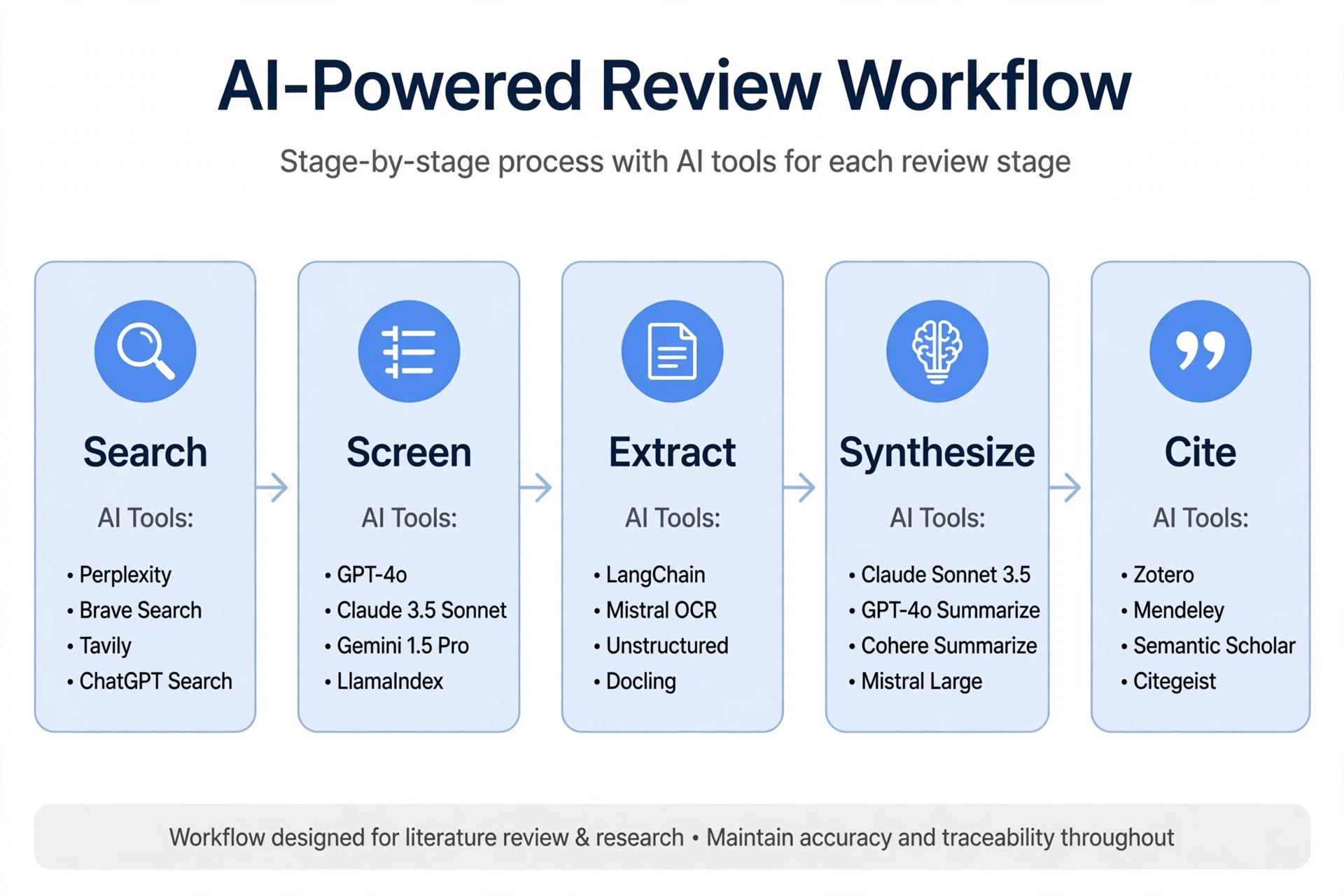
This guide organises eight tools by the stage of the review they serve — discovery, screening, extraction, synthesis, and writing/citation — so you can build a stack instead of picking a winner. It covers Elicit, Consensus, Scite, ResearchRabbit, Litmaps, Paperguide, SciSpace, and Connected Papers, with real pricing and the integrity line that separates legitimate research tools from essay-mill software.
The Review, in Five Stages
| Stage | The job | Tools that serve it |
|---|---|---|
| 1. Discovery | Find papers you did not know existed | ResearchRabbit, Litmaps, Connected Papers, Semantic Scholar |
| 2. Screening | Decide which papers to include | Elicit, Paperguide, Rayyan (screening specialist) |
| 3. Extraction | Pull methods, sample sizes, outcomes into a table | Elicit, Paperguide, SciSpace |
| 4. Synthesis | See what the evidence says together | Elicit, Consensus, Scite, SciSpace |
| 5. Writing / citation | Draft, cite, and manage references | Your reference manager (Zotero, Mendeley), NotebookLM for closed-corpus work |
Read the table this way: you need at least one tool per stage, and the tools in different rows are complements. Elicit plus ResearchRabbit plus Zotero is a stack. Elicit versus ResearchRabbit is a false choice.
The 8 Tools at a Glance
| Tool | Core job | Free tier | Paid starting point |
|---|---|---|---|
| ResearchRabbit | Citation-network discovery | Free | $0 |
| Litmaps | Citation timelines + alerts | 2 maps, 100 articles/map | Pro $10/mo (annual) |
| Connected Papers | Seed-paper similarity graph | 5 free graphs/mo | ~$3–6/mo (annual) |
| Elicit | Screening + extraction tables | Free Basic, limited | Plus $11/user/mo (annual) |
| Paperguide | End-to-end review workflow | Free, limited | Plus $12/mo (annual) |
| Consensus | Evidence check on a claim | Unlimited basic search | ~$9–10/mo (annual) |
| Scite | Citation context (supporting vs contrasting) | 7-day trial | Entry reported $12–20/mo — check vendor page |
| SciSpace | Deep reading one paper + copilot | Limited free | Premium ~$12/mo (annual) |
Prices were cross-checked in October 2026. Elicit’s figures come from its own pricing page (Plus $11, Pro $39, Scale $89 per user a month billed annually). Where secondary sources conflict — Scite’s entry tier, Paperguide’s Pro tier — the range is shown and you should check the vendor page before paying.
Stage 1: Discovery — Find the Papers You Would Miss
Discovery is where most reviews fail quietly. You search two databases with three keywords, miss the papers that use different terms, and never know it. Citation-network tools fix that by starting from a paper you already have and following the citation graph outward.
ResearchRabbit is free, and it is the best starting point for discovery. Seed it with a few papers you trust, and it maps co-authorship and citation networks, recommends related work, and tracks collections. It does not summarise or score papers — it finds them. For a free tool, that is the right scope.
Litmaps does the same job with a timeline view: seed a map from one article, then trace references forward and backward to see how a field developed. The free tier gives you 2 maps with up to 100 articles each. Pro at $10 a month billed annually adds literature alerts — Litmaps watches your topics and notifies you when new papers match. If your review runs for months, alerts are worth the price.
Connected Papers builds a single-seed similarity graph: one paper in, a visual cluster of related work out. It is the fastest way to orient yourself in an unfamiliar topic and spot the seminal nodes. The free tier gives 5 graphs a month; paid is reported at roughly $3–6 a month billed annually.
None of these tools tells you whether a paper is good. They tell you it exists and how it connects. That is the whole job of discovery, and it is worth doing before you screen anything.
Stage 2: Screening — Decide What Gets In
Screening is the inclusion/exclusion decision: which of the hundreds of papers you found belong in your review. For a narrative review, a spreadsheet works. For a systematic review, you need a tool that records decisions, handles duplicates, and can show its work.
Elicit is the strongest screening tool here. Its Pro plan offers a dedicated systematic-review workflow that can screen up to 5,000 papers, with PRISMA-grade screening and extraction accuracy claimed by the vendor — treat that as a vendor claim, not a measured fact. The free Basic tier covers casual exploration: unlimited search across 138M+ papers, unlimited summaries, and chat with papers where full text is available.
Paperguide runs a full Plan → Search → Screen → Extract → Generate workflow, with a Standard mode for up to 50 papers and an Extended mode for larger sets. It pulls from PubMed, arXiv, OpenAlex, Semantic Scholar, and your own reference library, and evaluates papers with SJR, SNIP, and citation metrics. Plus costs $12 a month billed annually; Pro is reported at $24–39 depending on the source, so check the vendor page.
A note on screening accuracy: AI screening tools can miss studies that expert searchers would catch. Treat AI screening as a fast, powerful starting point — not a complete search. For a systematic review that will be submitted, run a manual check on your excluded set, or pair the tool with a screening specialist like Rayyan for collaborative review.
Stage 3: Extraction — Pull Structured Data From Papers
Extraction is where AI tools earn their keep: pulling methods, sample sizes, outcomes, and limitations from dozens of papers into a structured table you can actually compare.
Elicit is the best extraction tool here. Ask a research question, and it finds relevant papers, then extracts methodology, sample size, and outcomes into a table with custom columns — 5 columns at a time on Plus, 20 on Pro, 30 on Scale. Export to RIS, CSV, BIB, PDF, and DOCX. Pro at $39 a user a month billed annually adds API access, custom extractions from uploaded papers, and explanations for AI-generated answers.
Paperguide extracts into workbooks with multi-paper analysis, and grounds every cited claim back to the source paper. Its workbook organisation takes 30–60 minutes to learn, but suits researchers managing 100+ papers.
SciSpace extracts at the single-paper level: its copilot reads a paper with you, answers questions about it, and handles maths and formulae in conversation. Premium is reported at about $12 a month billed annually. SciSpace is a deep-reading tool, not a bulk extraction tool — use it on the papers that matter most, not on all two hundred.
The rule for extraction: verify every extracted claim against the full text before it goes into your review. Elicit’s own maker, Ought, states plainly that Elicit does not yet know how to evaluate whether one paper is more trustworthy than another, and advises users to confirm that its summaries and extracted information are correct. If the vendor says check, check.
Stage 4: Synthesis — See What the Evidence Says Together
Synthesis is where you stop describing papers one by one and start saying what they mean together.
Consensus answers a specific question by aggregating what peer-reviewed studies found, with a Consensus Meter reading yes, no, or mixed. It is built for fast, evidence-grounded checks: “does X improve Y?” before you dig deeper. Free basic search is unlimited; Premium is reported at roughly $9–10 a month billed annually. Consensus is a gut-check tool, not a review tool — it answers one claim, not a field.
Scite shows how a paper has been cited by others, and whether those citations support or contrast its findings, using what it calls Smart Citations. It is the fastest way to check whether a study is well-regarded or quietly disputed. A paper with 200 citations looks authoritative until Scite shows that a third of them contrast its central claim. Entry pricing is reported at $12–20 a month depending on the source and plan — check scite.ai before paying, since sources disagree.
Elicit synthesises through its tables: once extraction columns are filled across fifty papers, patterns in methods and outcomes become visible in a way that fifty separate summaries never show. That is why Elicit appears in three stages — it is a screening, extraction, and synthesis tool in one.
Stage 5: Writing and Citation — What These Tools Do Not Do
None of the tools above formats your references. That job belongs to a reference manager — Zotero (free, with a Word plugin and 300 MB of free sync), Mendeley, or Paperpile — and to citation generators, which format references in APA 7, MLA 9, or Chicago 17. Citation formatting is a separate job with separate tools, and it is covered in our citation guide rather than here.
NotebookLM deserves one mention as a closed-corpus tool: it works only on PDFs you upload, links every answer to its source, and is free with limits. It is useful for deep analysis of a fixed set of papers you already own — a different job from discovering new ones. For reading one paper deeply, our guide to summarize-pdf-ai-guide covers single-document workflows.
The Integrity Line: Research Tools vs Essay Mills
Search for “AI literature review generator” and you will find two kinds of product. The first kind helps you find, screen, extract, and synthesise real papers. The second kind — tools like Aithor and Springcite — markets itself as “untraceable by AI detectors” and generates review text designed to pass as your own work. That is essay-mill framing, and it is academic misconduct at most institutions.
The line is simple: a legitimate tool works on real papers you can cite and check. An essay-mill tool generates text designed to evade detection. This article recommends only the first kind. Do not use any tool that advertises undetectability, and do not submit AI-generated review text as your own writing. Your supervisor, your examiner, and your institution’s integrity policy all expect the synthesis to be yours.
How to Build Your Stack
- Undergraduate essay or short review (10–20 papers): ResearchRabbit (free) for discovery + Consensus (free) for claim checks + Zotero for references. Total cost: $0.
- Master’s thesis or narrative review (30–80 papers): Litmaps (free or $10/mo) for discovery + Elicit Plus ($11/mo annual) for extraction tables + Scite for citation checks + Zotero. Total cost: roughly $11–21 a month.
- Systematic review or dissertation (100+ papers): Elicit Pro ($39/mo annual) for screening + extraction + Paperguide or Rayyan for collaborative screening + Scite + your reference manager. Check whether your university library already subscribes — many institutions carry these tools, and a librarian can tell you in one email. Total cost: roughly $39–69 a month, or $0 through your library.
- Fast evidence check on a single claim: Consensus (free) or Perplexity Pro. Do not spin up a full review stack for one question.
One more check before you pay for anything: ask your supervisor or librarian what your department already licenses. Institutional subscriptions frequently cover these tools, and students often assume costs fall on personal grants when the library already pays.
The Verify-Everything Workflow
AI tools in this category make a specific kind of error: confident, well-formatted, wrong. A table cell that says “n = 214” when the paper says “n = 124” looks authoritative in a spreadsheet. The defence is a workflow, not a setting:
- Extract, then spot-check. For every paper that carries a load-bearing claim in your review, open the full text and check the extracted numbers against it.
- Check the citation, not the summary. If a tool says “Smith (2023) found X,” open Smith (2023) and find X. Summaries compress; compression drops qualifiers.
- Treat corpus size as marketing. Vendor claims of “125M,” “138M,” “200M,” or “280M” papers disagree across sources for the same tool. Corpus size does not predict whether the tool finds the papers you need.
- Treat validation percentages as marketing. Claims like “99.5% screening recall” or “96% extraction accuracy” come from vendor materials without published methods. They are not measurements you can rely on.
- Keep a decision log. For a systematic review, record why each paper was included or excluded. Your examiner will ask, and a tool’s output alone is not an audit trail.
Frequently Asked Questions
What is the best AI tool for literature review?
There is no single best tool — the answer depends on the stage. ResearchRabbit or Litmaps for discovery, Elicit or Paperguide for screening and extraction, Scite for citation checks, Consensus for fast evidence checks on one claim. Build a stack, not a single pick.
Can AI do a systematic literature review alone?
No. AI tools can accelerate screening and extraction, but they can miss studies expert searchers would catch, and every extracted claim needs checking against the full text. For a submitted systematic review, pair the tool with manual checks and a recorded decision log.
Elicit vs Consensus — which should I use?
Different jobs. Elicit builds structured extraction tables across many papers for a review. Consensus answers one specific question with a yes/no/mixed reading of the evidence. Use Elicit for the review, Consensus for a fast check on a single claim.
Is it academic misconduct to use AI for a literature review?
Using AI to find, screen, extract, and organise papers is legitimate research assistance at most institutions, as long as you verify the output and write the synthesis yourself. Using a tool that generates review text designed to evade detection — marketed as “untraceable” — is misconduct. Check your institution’s policy and disclose AI use where it asks you to.
Are these tools free?
Several have genuinely useful free tiers: ResearchRabbit is free, Elicit Basic is free for light use, Consensus offers unlimited basic search, and Litmaps gives 2 free maps. Paid plans run roughly $10–39 a month billed annually. Check your university library first — many institutions subscribe.
The Bottom Line
Stop looking for one literature review tool. Start with ResearchRabbit for discovery, add Elicit for screening and extraction, check key papers with Scite, and gut-check single claims with Consensus. Verify every extracted claim against the full text, keep the synthesis yours, and never use a tool that advertises undetectability. The best review stack is the one whose output you can defend line by line.
Prices verified: October 2026. Elicit figures from elicit.com/pricing; other figures cross-checked across secondary sources and vary — confirm the current price on the vendor’s site before paying.