

Quick answer: Gamma’s free tier (400 one-time credits, free PPTX export) is the most capable free plan in 2026; Canva‘s free tier is the most sustainable long-term, with no credit expiry. Most “free” plans are either one-time credit grants or watermark your decks — pick the plan that breaks last for how you work. And always test PowerPoint exports before committing: that’s this category’s biggest pain point.
Let’s Be Honest About “Free” First
Every AI presentation maker can generate slides. That part is easy. What actually matters is everything around it: does it write useful content instead of filler? Can you edit the result properly? Can you export to PowerPoint? And where does the free plan start asking for money?
After comparing the free tiers, most “free” plans fall into two traps. Some hand you a one-time credit grant, which is really a trial with friendlier branding. Others watermark your decks or hold PowerPoint export hostage until you pay. This guide lays out exactly where each tool stands, so you can pick the free plan that breaks last for the way you work.
The 8 Best Free AI Presentation Makers in 2026
1. Gamma: Best Overall Free Experience
Gamma is the name everyone mentions first, and it earns it. Type a prompt, get a modern, web-native deck in minutes. The free tier is the most generous in the category: 400 one-time credits at signup, which works out to roughly 8–10 full presentations, with web publishing included (per Gamma’s pricing page).
- Free tier: 400 one-time credits (they don’t refresh)
- Export: PPTX and PDF. Free PPTX export is rare in this category.
- Catch: Once the credits are gone, AI generation stops, and free exports carry Gamma branding. PPTX exports can also mangle formatting on complex slides, so test before you depend on them.
Best for: The fastest full draft from a single prompt. Students get a lot of mileage out of it for semester projects.
2. Canva: Best Free Templates + Sustainable Free Use
Canva’s free plan pairs AI generation with thousands of templates, and unlike credit-based tools, there’s no expiration clock. The free education plan is genuinely excellent for students.
- Free tier: Free plan with a lifetime allotment of AI uses, plus the huge template library
- Export: PDF and shareable links are free; PowerPoint export needs Pro (around $180/year in the US as of 2026 — Canva raised prices in 2025, so check the current pricing page)
- Catch: PPTX export is paywalled. On the plus side, Canva produces the most reliable PPTX exports of any AI-native tool once you upgrade.
Best for: Steady free use with no credit anxiety, and anyone already living in Canva.
3. SlidesAI: Best Inside Google Slides
SlidesAI is an add-on that lives inside Google Slides (and PowerPoint): paste text, get slides. The free tier covers a few presentations per month, and because it generates natively in Slides, export fidelity is simply not a problem.
- Free tier: A few free presentations per month (confirm the current limit before you commit)
- Export: Native Google Slides, so “export” is a non-issue
- Catch: The monthly cap is tight if you make decks constantly.
Best for: People who live in Google Slides and want AI without leaving it.
4. Visme: Best for Unlimited Projects
Visme’s free Basic plan allows unlimited projects, which is unusually generous for sustained free use — most competitors cap you somewhere.
- Free tier: Unlimited projects on the free plan (plan pages mention a per-project slide limit; verify the current number)
- Export: Published content carries Visme branding on free; downloads are limited to basic formats
- Catch: Branding on free published decks, and PPTX export needs a paid tier. Fine for internal work, a problem for client decks.
Best for: Long-term free use when branding on internal decks doesn’t bother you.
5. Pitch: Best for Small Teams
Pitch’s free plan is built for collaboration: comments, version history, sharing, and a stated allowance for small teams with a one-time AI credit grant.
- Free tier: Team allowance plus one-time AI credits (verify the current team size and credit grant on their pricing page — these numbers have shifted before)
- Catch: The AI credits are one-time, so the “free AI” part runs out while the collaboration stays free.
Best for: Startups and student teams evaluating a collaborative workflow.
6. Julius AI: Best for Data-Heavy Decks
Here’s the one most lists miss. Julius builds presentations on real data: live charts, code execution, actual analysis. If your deck needs genuine numbers instead of placeholder bar charts, this is the tool.
- Free tier: Limited monthly messages (check current limits)
- Catch: Monthly cap, and it’s a data tool first, design tool second. Don’t expect Gamma-level polish.
Best for: Analysts, researchers, and anyone whose slides need real charts.
7. Google Slides + Gemini: Best If You’re Already in Workspace
If your school or company has Google Workspace, you may already have Gemini features inside Slides at no extra cost. Not the flashiest generator, but zero new accounts and zero learning curve.
- Free tier: Depends on your Workspace plan
- Catch: The full AI feature set needs a qualifying paid plan. Confirm what’s included in yours before you plan around it.
Best for: The path of least resistance inside Google’s ecosystem.
8. Microsoft Copilot in PowerPoint: Best for PowerPoint Loyalists
Copilot can turn a Word document into a PowerPoint deck, which is genuinely useful when your content already exists in document form. A free Copilot Chat exists, though the deep PowerPoint integration needs Microsoft 365.
- Free tier: Free Copilot Chat; full features need Microsoft 365
- Catch: The deep PowerPoint integration is paywalled behind 365.
Best for: Corporate users whose final format must be .pptx, no exceptions.
Quick Comparison Table
| Tool | Free Tier Shape | PPTX Export Free? | Watermark/Branding |
|---|---|---|---|
| Gamma | 400 one-time credits | Yes (test formatting) | Yes on free |
| Canva | Lifetime AI uses, no expiry | No (Pro) | No |
| SlidesAI | Few per month | Native (non-issue) | No |
| Visme | Unlimited projects | Limited (paid for PPTX) | Yes on free |
| Pitch | One-time AI credits | Check plan | Check plan |
| Julius AI | Limited monthly | Check plan | Check plan |
| Slides + Gemini | Via Workspace | Native | No |
| Copilot | Chat free; 365 for full | Native | No |
Prices verified: October 2026.
4 Questions to Ask Before You Commit
This matters more than any comparison table:
- Are the free credits monthly or one-time? Monthly refresh means sustainable. A one-time grant means a trial with better marketing.
- Can you export the file, and in what format? If it’s PDF-only, will your audience ever need to edit the slides? For client work, PPTX matters.
- Does branding appear on the finished deck? For internal updates, nobody cares. For a client pitch or thesis defense, it does.
- Where do your numbers come from? If your data lives in a spreadsheet you maintain, any design tool works. If it lives in a database, pick the tool that can read it (Julius).
The Workflow That Actually Works
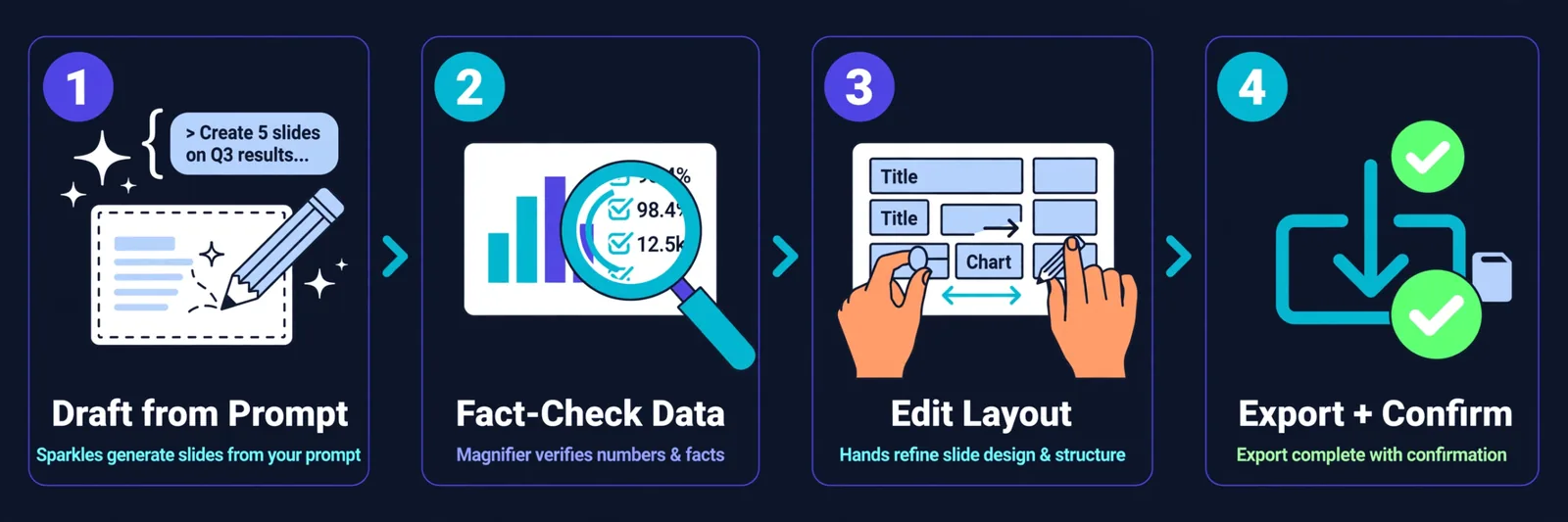
Our recommended approach, refined from making far too many decks:
- Generate the first draft with AI (Gamma for speed, SlidesAI if you’re in Google Slides).
- Fact-check everything. AI presentation tools hallucinate data points. Every number, every claim — verify it. This is the step people skip, and it’s the one that matters most.
- Edit for 15–60 minutes. Fix repetitive layouts, replace generic stock imagery, cut the filler bullets. AI gives you the skeleton; you add the judgment.
- Test your export. If the final format is PPTX, export early and check formatting before you’ve invested hours.
AI is a first-draft accelerator, not a designer replacement. Budget the human editing time and you’ll get decks that look like you hired someone.

Whichever tool you pick, generate your first draft this week. The best presentation tool is the one you actually use, and every day spent deliberating is a day you could have spent editing a finished draft.
FAQ
What is the best free AI presentation maker in 2026?
Gamma offers the most capable free tier (400 one-time credits, free PPTX export). Canva is the most sustainable long-term free option with no credit expiry. SlidesAI is best inside Google Slides.
Do free AI presentation makers add watermarks?
Several do. Gamma keeps its branding on free exports; Visme brands published free content. Canva’s free tier doesn’t watermark, but locks PPTX export behind Pro.
Can AI replace PowerPoint?
For creation, often yes. But PowerPoint remains necessary for strict format requirements, complex animations, macros, or compliance docs that must be .pptx. The practical approach: create with AI, export to PowerPoint when compatibility requires it.
How reliable are AI-to-PowerPoint exports?
It’s the category’s biggest pain point. Gamma’s PPTX exports can break formatting; Canva’s are the most reliable among AI-native tools. Tools that generate natively in Slides or PowerPoint (SlidesAI, Copilot) avoid the issue entirely. Always test exports before committing.
Can AI presentation tools replace designers?
Not entirely. They produce structured first drafts fast, but output shows repetitive layouts, surface-level bullets, and generic imagery. Treat AI as the accelerator and budget human editing time.
Which is best for students?
Gamma’s free credits cover multiple semester projects, and Canva’s free education plan is excellent. Both are genuinely usable at $0.
Keep reading:
– Gamma AI Review: Is It the Best AI Presentation Tool?
– 10 Best Free AI Tools for Students in 2026
– How to Create Consistent Characters with AI (2026 Guide)